Seferehov, ten days later: from 45% to 85% correct matches on the same 8 GB GPU
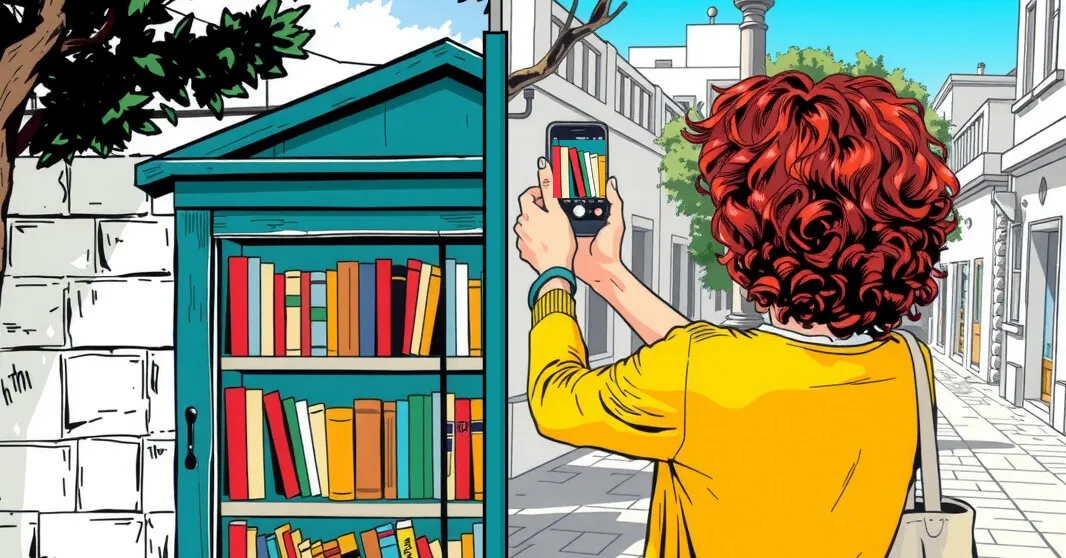
Wow, I never expected such bad results from my simple app. Seferehov is supposed to help map the books in street libraries. I thought OCR, reading text from a picture, was a solved problem by now. It was one of the earliest AI tools, used to read handwritten zip codes on envelopes automatically. Was I in for a rude awakening.
Book spines are not envelopes. The letters run up or down, in Hebrew or in English, sometimes upside down, on shiny covers in bad street light.
Ten days ago I wrote about Seferehov, a phone app that reads whole bookshelves with AI models running on one 2016 graphics card in my home. That post described the design: a chain of local tools that check each other, and a person who approves every book.
Since then I used it for real. I photographed street libraries and my own shelves, and I approved or declined about 400 books in the app’s queue. This post is about what that showed. It covers the failures, with real examples, the changes that fixed them, and the numbers before and after.
The short version: when the app attaches a catalogue record to a book, that record is now right 85% of the time, up from 45%. None of those matches needed a correction. About a third of everything the camera reads now never reaches me at all: duplicates are merged and junk is set aside automatically.
Nothing changed in the hardware. It is still one NVIDIA GTX 1080 with 8 GB, and there are still no paid APIs. I use Claude only to develop the app. The app itself calls no paid AI services, so there is no open-ended token bill that grows with every photo.
How I worked: decline, then ask why
The method was simple. I went through the queue on my phone and approved, corrected or declined each book. Every decision is stored with the photos and a trace of every AI step. Then I asked Claude Code to read my decisions and find the causes. A typical instruction, typos included:
check all my approvals and rejections so far and analyze what went wrong. some have bad cropped spines - so give up.
On 6 November that analysis covered 108 decisions since 3 November. It sorted the problems into groups, and each group became a fix. The rest of this post goes through them.
The failures, with real examples
1. The right title, the wrong book
Six of my declines were a book with the same title by another author. “משוואה עם נעלם” (An equation with an unknown) by the novelist Uri Adelman was matched to a 2005 social-work study with the same title. The author on the spine was ignored when no catalogue knew the exact spelling, and the app then searched by title alone.
Fix: the author read on the spine is now a veto. A record by someone else is never taken, and a record that names no author needs nearly the whole title to match. The second rule came from “Mr Nice 2” by Howard Marks, which had been matched to a record called “Mr. Nice Spy” with no author.
2. Title and author the wrong way round
Eight of my 13 corrections were the same thing: the title was in the author field and the author in the title field. Book spines put them in either order.
Fix: before any lookup, the server checks whether the “title” is a known author’s name and the “author” is not. It checks against a local list of 300,000 names from Hebrew Wikipedia and Wikidata. Tested on my corrections, it swapped 5 of the 6 readings that were the wrong way round and none of the 8 that were right.
Building it found a bug that had been hurting other steps too. The name lookup kept the first 20 candidates in alphabetical order, not the 20 closest. It missed even סמדר שיר and חיים נחמן ביאליק.
The swap then made its own mistakes. On real shelves it swapped “דילמה” (Dilemma) by ליאורה ורדי, because “דילמה” is also a name in the list. Seven items went wrong the same way: one-word titles like “דילמה”, “היום” and “פינה”. A name has at least two words, so a one-word title is now never treated as a name. That rule prevents all seven and keeps every correct swap.
3. Upside-down spines
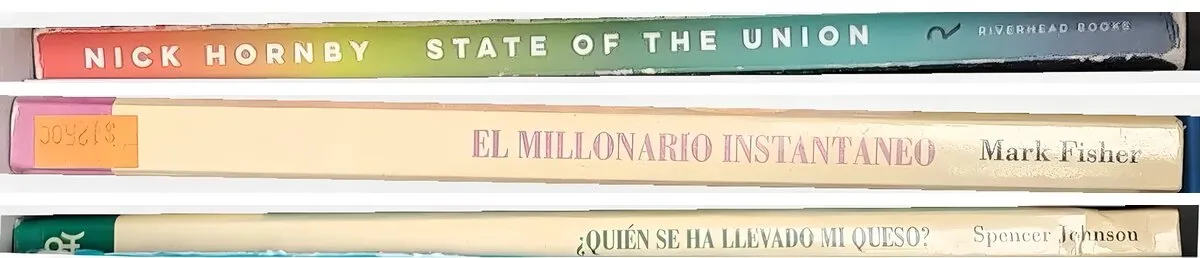
English and Spanish spines run from bottom to top; Hebrew spines run from top to bottom. The server tries both directions and keeps the one where two readers agree. But both readers, the vision model and Surya OCR, read upside-down Latin print almost as well as upright print. So both directions agreed, and the tie went to the Hebrew direction.
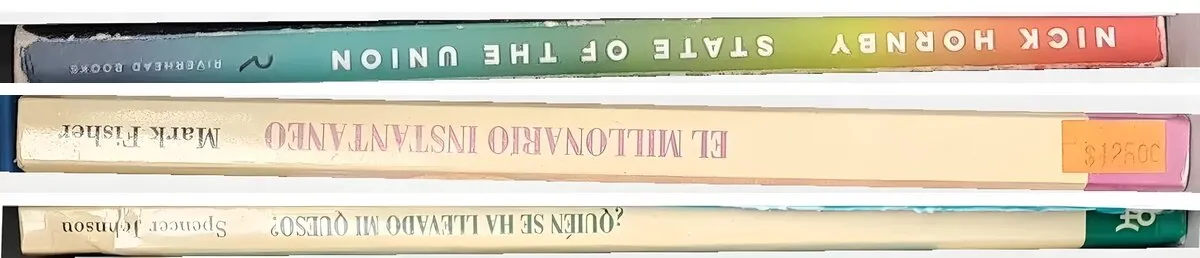
The fix uses the weakness of a third reader. Tesseract, the old free OCR engine, reads upside-down print very badly. When both directions are confirmed, Tesseract reads both, and the direction where its text matches the title wins. On the five upside-down spines from that day it turned four the right way: Tesseract’s text matched the title 0.80 to 1.00 on the right side, against 0.05 to 0.23 on the wrong side. The fifth stayed as it was: the letters on “Der Ermittler” are too large for Tesseract. It left the two Hebrew spines in the same photos alone. On the 70 pictures waiting in the queue, it turned four and did not turn any picture that was already right.
A book lying flat had a second problem. Only standing spines were cut tight and straightened, so its picture kept most of the cover and the shelf around it.
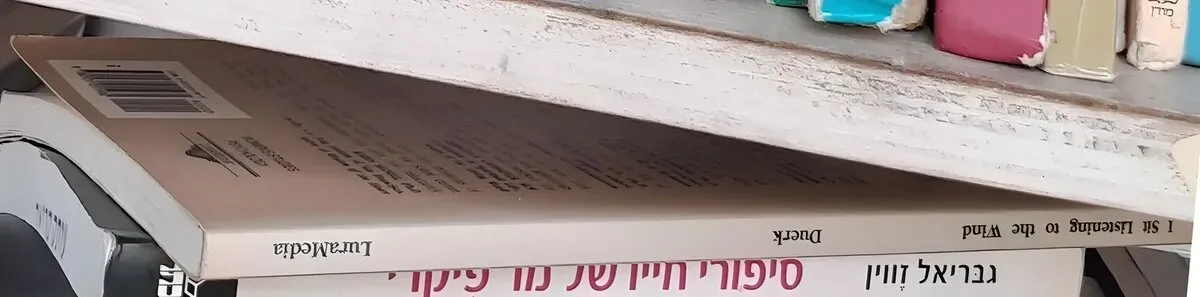
A long, level cut-out is now treated as a spine too:

4. Cover blurbs read as titles
From one photo the queue got “INTERNATIONAL BEST SELLER” and “OVER 10,000,000 COPIES SOLD”, both printed on the cover of a self-help book. Worse, each one was matched to a real book. “INTERNATIONAL BEST SELLER” became “Master Key System: #1 International Best Seller”. “LEE CHILD”, read off a different spine, became “Bloomsbury Murder” by Mike Hollow, whose catalogue subtitle quotes Lee Child.
The cause was a matching rule meant for Hebrew. Library of Congress records give Hebrew books romanized titles, so the app also searches a record’s alternative titles. For an English reading, that let a few words match anywhere in a subtitle. The rule now applies only to Hebrew readings, and readings that are sales phrases are dropped before any lookup.
5. Catalogue records that are wrong
Some failures were in the data, not in the reading:
- A book was shown as “מה לאכול: ekh li-veḥor mazon nakhon u-vari bi-mevokhe ha-supermarḳeṭ ha-moderni”. Open Library gives about 16,800 Hebrew books a Hebrew title with a subtitle in Latin letters. The server now takes the Hebrew title from the National Library of Israel, or keeps just the Hebrew part.
- “אשה בורחת מבשורה” by David Grossman listed four authors: דויד גרוסמן, Hanan Senir, Teatron ha-Kameri shel Tel-Aviv and Habimah. The record was for the stage production. Theatres, councils and publishers are now removed from author lists. In a Hebrew book, names in Latin letters next to Hebrew names are removed too.
- One fix created a new error, which I caught in testing. To find Hebrew author names, the server compares consonants across scripts. It replaced “Baruch Sterman” with “יהונקא ברכה”, because “Baruch” and “ברכה” share consonants. The whole name must match now, not one word.
6. Bad crops
Six declines were spine pictures cut so badly that nobody could read them, sometimes mostly white. The camera now takes an extra photo at each pause, and the server keeps the best cut of each spine across all photos. A spine that is badly cut in every photo, more than a quarter blank, and found in no catalogue is given up automatically. I don’t see it at all.
7. Failures outside the AI
- The GPU ran out of memory. On 8 November a session of 37 photos failed with one error. Another job on the same GPU loaded a model at the same moment, and the vision model crashed. A model call now waits and tries again, up to three times, instead of failing the whole session.
- The free search engines said no. The server uses web search to fix misread titles. 56 web checks were skipped because the engines paused us after a burst of searches. Each search now goes to one engine in turn (Brave, Yandex, Yahoo, or Mwmbl when the others rest), with limits for each engine. A check that cannot run now waits in a queue and runs later, faster at night.
I also asked whether users’ phones could do the searching, so that no single server hits the limits. The answer was no. Browsers cannot read search engines’ result pages, and spreading searches across phones to get past an engine’s limits would break its terms.
The breakthroughs
Most fixes above are guardrails: they stop wrong answers. Four changes added new ways to find the right answer.
A local title index. A spine reading that no catalogue knows is first compared with 225,000 titles: Hebrew Wikipedia, Wikidata, the Ben-Yehuda project, and 7,146 titles from Israeli publishers’ own websites. The publisher sites are read only when their terms and robots.txt allow it. Checking every site’s terms by hand also found a mistake in my own checker. It had judged Bookpod by its terms for authors and missed the site terms, which forbid robots. So far the index corrected 39 titles and 17 author names automatically. “המילים סוד” became “סוד המילים” by יוכבד בן-דור, and that one was then found in a catalogue.
Confidence, measured. Every book now gets a confidence score from the evidence: a barcode, a catalogue match confirmed by OCR, a correction from the index, a reading alone. The queue shows the surest first. The scores hold up against my decisions (table below). A high-confidence item can be approved with one glance, and a low one needs reading.
Covers needed more than spines. On 8 November I asked:
research and find ways to improve text from covers extraction. The current waiting list I have is low quality. Perhaps several passes and several strategies combined will produce better results.
Back-cover sentences. For covers, the strongest new step is to search one sentence from the back cover, word for word. Shops, publishers and Goodreads quote the blurb, and their page titles name the book. A photo of a back cover alone, starting “מורה מחפש תלמיד עם תשוקה עזה להציל את העולם”, found “ישמעאל” by Daniel Quinn. A front cover read as nonsense (“הסיגרים אדוינד אדיגה הלבון”) found “הטיגריס הלבן” by Aravind Adiga.
Author first. When the author is read well but the title is not, the server takes that author’s books from the local index and the National Library. It keeps the one whose title is printed on the cover.
Covers also got the spine corrections and a second, closer read of the biggest lines: title and author are cut out, enlarged, and read again by two OCR engines that vote. I re-read the 20 covers I had corrected or declined so far:
| 20 covers I had corrected or declined | Now |
|---|---|
| Right, with no correction | 15 |
| A book by the author on the cover, but not the one I chose | 2 |
| Not found (they wait for a person, as read) | 3 |
The first full test also had one wrong book. A back cover by צפרת רז was matched to a memorial booklet called “איש צדיק היה”. Its three title words are common words, and all of them appeared somewhere in the long blurb. The author-first step now needs the title on one line of the front cover, and a record that names the same author. Re-tested, that back cover now finds the right book through its blurb.
The numbers
These are from one database: every item the app read off a shelf since mid-October, and my decision on each. I compare items scanned before 4 November with items scanned from 4 November, when most of these fixes were in place.
When the app attaches a catalogue record, is it the right book?
| Shelf scans | Matched items I decided | Approved with no change | Corrected | Declined |
|---|---|---|---|---|
| Before 4 Nov | 88 | 40 (45%) | 7 (8%) | 41 (47%) |
| From 4 Nov | 120 | 102 (85%) | 0 | 18 (15%) |
That is a rise from 45% to 85%. The 95% confidence intervals are 36–56% before and 78–90% after, so they do not overlap. A two-proportion test gives z ≈ 6.1. With samples of this size, a difference this large is very unlikely to be chance.
Not every one of the 18 declines was a misread title. “3rd Degree” by James Patterson had the right title and author, on a printing the photo could not confirm. “The Millionaire Next Door” was matched to an audiobook record, from a blurred photo with no cut-out of the spine. Both came from a reading of the whole shelf, with no cut-out of the book’s own spine. Since 4 November I declined all three matches made that way. So audiobook and ebook records are now never matched to a shelf book, and a match read only from the whole shelf is marked unsure (confidence 45) instead of 85–90.
Items the app could not match got better too: 33% were approved as read, up from 11%.
Does the confidence score mean anything?
| Confidence | Evidence | Approved with no change |
|---|---|---|
| 90 | catalogue match, confirmed by OCR | 65 of 75 (87%) |
| 75 | corrected, then found in a catalogue | 36 of 42 (86%) |
| 65 | known to the local title index | 12 of 13 (92%) |
| 55 | corrected by a web search | 6 of 8 (75%) |
| 40 | an OCR reading, nothing else | 10 of 63 (16%) |
| 15 | a low-quality reading | none shown: all 32 set aside automatically |
The scale separates well. At 65 and above, nearly nine in ten are right. At 40, most are wrong or need typing. That is where my attention goes now.
How much work is left for a person?
| Per 100 spines read | Before 4 Nov | From 4 Nov |
|---|---|---|
| Handled without me (duplicates merged, junk set aside, known books confirmed) | 15 | 34 |
| Shown to me | 82 | 66 |
| Needed a correction | 12 | 7 |
Of the items the app matched to a catalogue record, 8% needed a correction before and none after.
My median time per decision fell from 9.6 to 8.0 seconds. A correction took 35 seconds on average before and 26 seconds after. Combining the counts and the times, reviewing 100 spines took about 23 minutes before and about 15 minutes after. That is about a third less human time for the same number of spines.
These numbers have limits. There is one reviewer, me. The shelves differ between the two periods, and the earlier period includes some video scans. The samples are in the hundreds, not thousands. The direction is clear, but the exact percentages will move as more people scan.
A side effect: where is my book?
Once every spine was being located on its photo, a new feature was cheap. I have books in several rooms at home, so I asked:
At home I have many books in different rooms, can you add an automatic feature to help me locate a book after scanning many spines
Every book’s page now shows the shelf photo it was seen in. The photo is darkened except for the spine, which is outlined, and the page names the books to its left and right. You can give a home scan a name, like “study, top shelf”. It works at street libraries too.
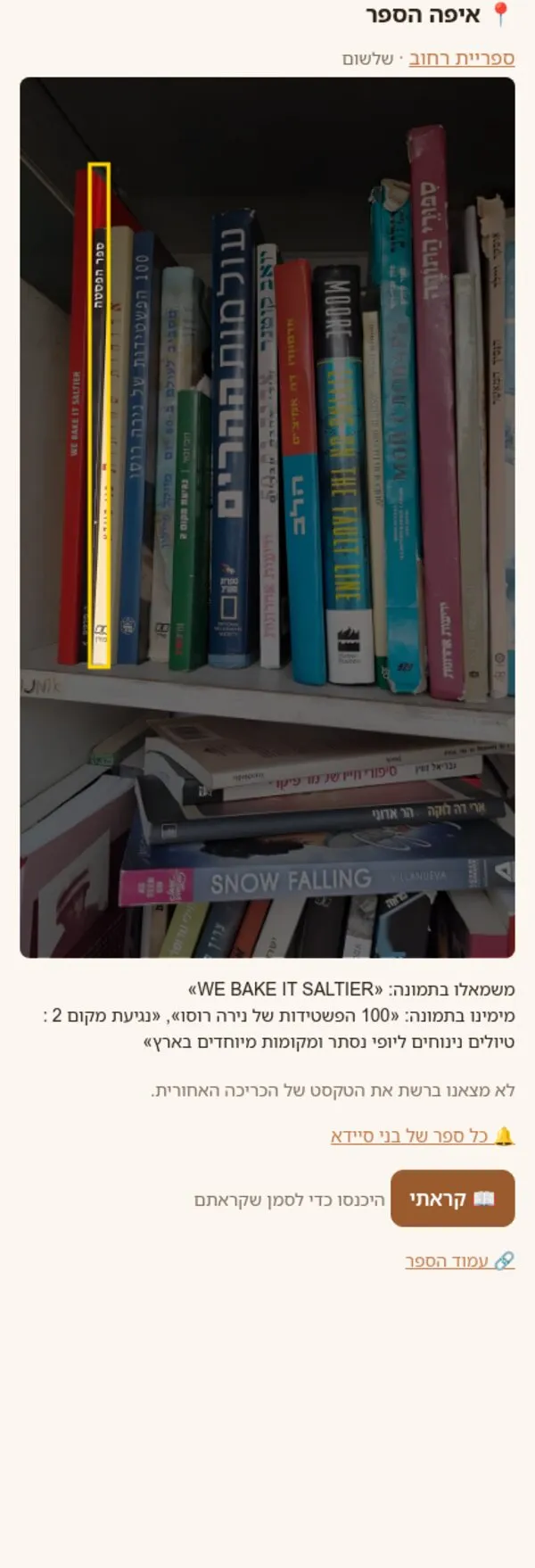
The first version outlined three or four thin spines at once, because the vision model’s box takes in neighbours. The outline is now narrowed to the band where OCR finds the book’s own title.
When Claude Code said no
Most of my instructions were carried out as written. The more useful moments were the ones where Claude Code pushed back, or caught its own mistakes. Here are a few, quoted as written.
Spreading searches over users’ phones. The free search engines kept pausing the server, so I asked:
can we use the user’s phone to do a distributed search engine search which will not trigger the limits of a centrally used free search?
The answer:
Mostly not possible, and the part that would work isn’t something I’d build. … Spreading searches across users’ phones so each engine sees many small users instead of one server is exactly what the engines’ limits are meant to stop. It would break their terms, and it would use people’s phones and data plans for searches they didn’t make.
It then proposed what was built instead: one engine per search in turn, and a queue that runs slowly at night. In the same work it tested Google’s embeddable search box, which gave by far the best Hebrew results. It left it out on its own, because that box is not meant to be used this way.
A publisher’s terms. I asked it to read Bookpod’s terms again and start reading their catalogue if they allowed it. It refused, and corrected itself:
I didn’t start reading Bookpod: their terms forbid it, so it still needs their written permission. … So I was wrong last time to suggest Bookpod might not need an email.
The first terms check had read Bookpod’s terms for authors, not the site’s terms. So I asked it to re-check every site already marked as allowed. One of them, prag.co.il, forbids robots, and 135 of its books were already in the index. They were deleted. The re-check also found two sites flagged wrongly: one sentence was about returning opened products, the other about spreading viruses.
A re-run I insisted on. Claude Code reported that it had not re-run the whole queue through the new matching, because the re-run would remove good matches. I told it to apply the re-run anyway. It did, but first:
a plain run would have made 8 items worse, so I fixed the script first.
The re-run also exposed a bug in its own swap rule: the one-word titles described above.
“This photo should never have been sent.” I complained about a cut-off cover photo and asked for the phone’s model to block such photos. Claude Code corrected my words (it is a small image classifier, not a language model) and disagreed with “never”:
If I remove the time limit, no cut-off photo is sent, but about 1 whole cover in 10 could get stuck… I’d keep the limit for now and check the camera reports after your next real session.
I agreed. A rule like “never” usually has a cost, and here the cost was in numbers.
My own idea, half rejected by a test. I suggested combining several photos of the same cover into one sharper picture. Claude Code tried it and measured it. The merged picture read worse than any single photo, so that half was dropped. Reading each photo separately and letting them vote was kept, because different photos get different words right.
Its own numbers. While writing this post, Claude Code checked my draft against the data and found that it had told me “5 of 6” upside-down spines were fixed; the real figure was 4 of 5. It had also written a reason for two of my declines that it had guessed, not looked up. When I asked to see the evidence, it showed me the photos and the records and replaced the guess with what the data shows.
What I learned
- The decline button is the most valuable data in the app. Every fix in this post started from a decision I made in the queue and a trace that showed why.
- Fixes create new errors. The swap made seven wrong swaps, and the Hebrew-names fix renamed Baruch Sterman. I found them because every change was re-run on real data before and after, not only on the case that prompted it.
- A weak tool can break a tie. Tesseract is the worst reader in the chain, and that is exactly why it can tell up from down.
- Free data beats a bigger model. Most of the gain came from data: 225,000 local titles, 300,000 names, publishers’ own lists and the National Library, all checked against the photo. The model is the same 8B vision model on the same card.
The whole period was again built with Claude Code: 63 commits in ten days. My part was the same as before: testing on real shelves, deciding what counts as correct, and asking for measurements before trusting a fix.
If your business has documents in Hebrew that people still type by hand, the same approach applies: local models that check each other, measured on your own data, with a person who approves. Book a call and I will run a sample of your documents through a pipeline like this one and show you the measured results.