Seferehov: a night shift for Claude Code, and a camera for shaky hands
Four days ago I wrote Seferehov, ten days later: the app that reads street library shelves with AI models on one 2016 graphics card got its catalogue matches right 85% of the time, up from 45%.
That post was about reading the books the app finds. This one is mostly about the books it never finds, and about the people holding the phone. Three things changed:
- Claude Code got a night shift. It now runs experiments on my home server while I sleep, on my own Claude subscription, as a user that can read the data but cannot change anything that matters.
- The first experiment found many more books: 59 of 68 on the test shelves, against 47 today. It is not live yet, because it doubles the time per photo.
- The camera stopped waiting for a still hand. The phone’s own logs showed why ordinary readers got so few photos, and it was not what I thought.
The app itself got 20 commits since then. The ones that matter to readers are at the end.
The books nobody sees
When I approve books in the queue, I only see what the app found. A book it missed never reaches me, so I could not tell how many there were. So I asked:
research ways to improve finding missing spines, maybe train a llm model with extra few layers to do this?
Claude Code’s answer was to measure first. It took 7 shelf photos where I had already approved every book, 68 books in all, and checked where each missed book was lost:
- Was it ever outlined as a spine?
- Was it outlined but read wrong?
- Or did it simply fall between the lines?
Most of the missed books were never outlined at all. The vision model looks at the whole photo at once and draws a box around each spine. On a crowded shelf it gives up after the clear ones. The thin spines, the books lying flat and the ones half in shadow get no box, so nothing later in the chain ever looks at them.
That changed the plan. Training extra layers onto the language model would mostly improve reading, which was not the main problem. The cheaper ideas came first:
- Cut each spine out first, then read it, instead of reading the whole photo first. Measured on the 7 photos: the same 47 books, and 100 minutes instead of 63. Dropped.
- Look at the photo in strips. Three overlapping horizontal strips, each sent to the model on its own, so each spine is bigger in the picture. Then join the boxes, merge the halves of a book cut by a strip’s edge, and drop a box that is really a whole shelf.
Strips found 59 of 68 books, against 47. Here is one photo before and after. Green is a book the app found, red is a book I know is there and the app missed:
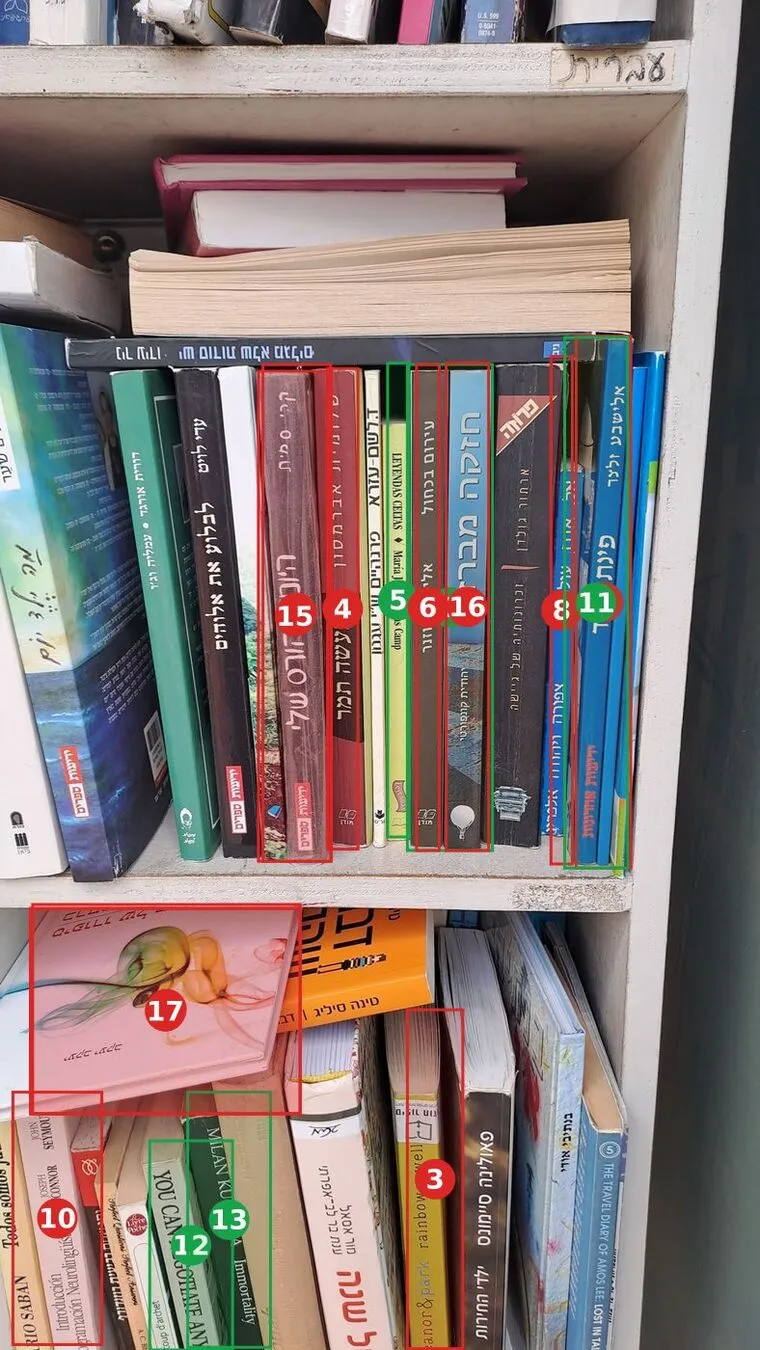
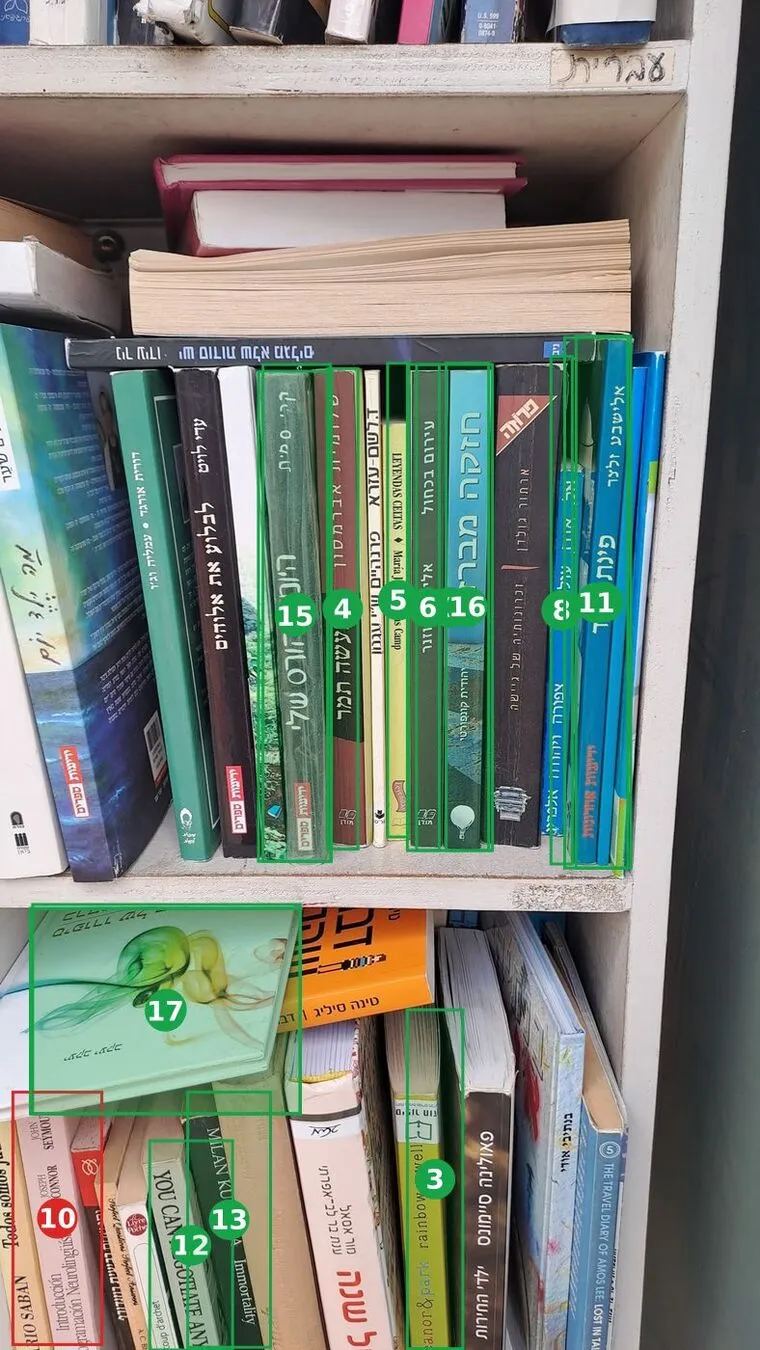
On this photo it went from 5 books to 16 of 17. It also found real books that I had never been shown, because they were missed the first time: Milan Kundera, Paulina Simons, The Travel Diary of Amos Lee.
The cost is the problem. Strips need 980 model calls for the 7 photos instead of 406, so 147 minutes instead of 66. On one GTX 1080 that halves the number of photos the app can read in a day. So it is not live. The next experiment is to use strips only when the first pass looks wrong (few boxes, or one box much wider than the others), and check whether that keeps most of the gain at a fraction of the cost.
Each of those runs takes one to two hours of GPU time. That is why I wanted them to run at night.
A night shift for Claude Code
I asked whether Claude Code could run these experiments by itself at night, using my own subscription token, the same way a client project of mine runs on its owner’s token.
It can. claude setup-token gives a long-lived token for your subscription, and claude -p runs a task with no one at the keyboard. Every night at 23:30 a timer on my home server starts Claude Code with one instruction: take the top item from the experiment list, run it on the benchmark photos, write up the result, and move to the next item if there is time.
The hard part was not starting it. Overnight it runs with permission prompts turned off, so nobody approves each command. That means the limits have to come from the machine, not from the prompt:
- Its own Unix user,
lab. No sudo. Not in the Docker group, which on Linux is as good as root. It cannot read my home folder or the app’s secrets. - The database is read-only. A Postgres role that can only read the five tables it needs. I checked that a write is refused.
- Photos and traces are read-only. Mounted into its folder read-only.
- Readers’ scans come first on the GPU. All GPU work on my server goes through one priority queue. By day the lab has the lowest priority. At night it is raised to the readers’ level: at the lowest priority it took turns with a stream of small jobs from another project and managed one model call every five minutes.
- It cannot ship anything. It has write access to one private GitHub repository: its own notes and results. A change to Seferehov goes to a branch in a repository on the same server, behind a setting that is off by default. I fetch it and decide.
- Hard stops. Seven hours at most, 300 steps at most, 80% of the CPU at most, and a
STOPfile that ends the run at once.
In the morning I get an email with a one-line summary and a link to a page on my own server: each shelf photo with every book outlined in green or red, so I can see the result instead of reading IDs. The two pictures above are from that page.
Not eating my morning’s quota
A night run uses the same subscription I work with during the day. Claude subscriptions have a 5-hour window and a weekly limit, and I don’t want to sit down in the morning and find the window used up by a robot.
The token from setup-token cannot open the usage page, so the night job sends a one-word request (about 25 tokens) and reads the usage from the reply. It does that at the start, every 10 minutes, and at the end. It stops early if:
- the 5-hour window that will still be open at 08:00 is more than 25% used;
- any 5-hour window is more than 90% used;
- this night used 10% of the week;
- or the week is more than 80% used.
The report ends with a small table: the 5-hour window and the week at the start and at the end of the night, and when each resets.
A camera for ordinary hands
The second request was about the people holding the phone:
Currently it is very sensitive and the user needs to support the hand holding the phone so it is perfectly still. We need to allow user who is not a perfect photographer to scan shelves quickly and easily.
The camera takes a photo by itself when the picture is new and the phone stops moving. I assumed the fix was a looser threshold. The phone’s own logs said otherwise. Every camera session sends home a report of numbers: how fast the picture moved, how long each photo took. The last six sessions showed this:
- Encoding each 4K photo as a JPEG took about 9 seconds on the phone.
- Meanwhile the steadiness check, meant to run 7 times a second, ran once every 1.4 seconds.
- Over 1.4 seconds a hand drifts far enough that the check “lost” the picture half the time, and a lost picture counted as moving fast.
- So the “slower” sign showed about 40% of the time, and photos came 2 to 6 seconds after the reader stopped.
The phone was not too sensitive. It was too busy to look.
The changes:
- The JPEG is now made in a background worker, so the checks keep running while a photo is saved.
- Trembling is not moving. A shaking hand moves the picture fast but goes nowhere; walking along a shelf goes somewhere. “Holding” now means the picture’s net drift over the last second is small, however much it trembles.
- It learns your hand. Each reader’s tremor is measured and kept on the phone, and the limits for “steady” and “roughly steady” grow with it.
- It never waits for perfect. At most 1.6 seconds after you stop, it takes the best frame it saw: sharp, and taken when the gyroscope said the phone was calmest.
- One glitch is not a move. A lost picture while the gyroscope says the phone was still is ignored.
I tested it in Chrome with a fake camera: a video of a shelf with four stops, each followed by a move along the shelf.
| The simulated hand | Old camera | New camera |
|---|---|---|
| Heavy tremor | 0 photos in 12 seconds | a photo at each of the 4 stops |
| Mild tremor | 4 of 4 | 4 of 4 |
Steady hands lose nothing, and shaky hands go from nothing to every stop. The test video was not 4K, so the slow encoding was not part of it. The real test is the next sessions on real phones, and the camera reports will show it.
The rest, briefly
- One camera for everything. Shelves, front covers and back covers are photographed in any order, and the server works out which is which and pairs fronts with backs. The phone used to guess, and on 3 November it split 3 books into 6, because a book turned over on a shelf moves in the picture just like the phone moving on.
- Confidence checked against my decisions. About 560 approvals and declines from 6 to 10 November. The strongest signal was whether the catalogue record is by the author printed on the spine. With the new rules, books scored 75 or more agree with my decision 96% of the time, up from 84%. All 46 books in the new top tier, “sure”, were approved. They could be approved without me, but that switch stays off until the next batch of decisions confirms it.
- The catalogues get gentle treatment. Requests to each catalogue site are spaced out, and I get an email when the scan queue gets long.
- Tests. On 11 November a change left two screens stuck on “Loading…” in production. Now every push runs lint, unit tests, a build, and an end-to-end run that opens every screen in a real browser, as a visitor, a reader and an admin, in Hebrew and English. A push that fails does not go out. The first run also found a covers-camera button that had stopped working.
What I learned
- Measure where things get lost before you train anything. “Train a model” was my first idea. The measurement showed the books were lost before reading even started, and a much cheaper change found most of them.
- Logs from real use beat my guesses. I was sure the camera was too strict. It was too slow to look, and only the phone’s own numbers showed that.
- Unattended AI is a permissions problem, not a prompt problem. The night job is safe because of what the
labuser cannot do, not because of what I told Claude Code not to do.
As before, all of it was built with Claude Code. My part was using the app for real, deciding what counts as right, and asking for numbers before trusting a fix.
If you have slow experiments that could run while you sleep, on your own hardware and your own subscription, the same setup works outside books. Get in touch and I’ll show you how it is wired.